This post walks through the main steps of configuring a replica set of MongoDB with 3 nodes, running on AWC EC2 infrastructure.
It includes key certain items as:
- Create and attach a new Security Group to EC2 instance, to allow the communication between MongoDB nodes
- Configure the replica set
- Simple unit-testing on the replica set
Pre-requisites
To proceed this hands on lab, it requires 3 nodes of MongoDB on AWS EC2 with default configuration.
You can refer to this post for detail instruction on how to provision and configure a newly fresh MongoDB on AWS EC2 (https://pnle.blog/2024/05/30/setup-standalone-mongodb-community-on-aws-ec2/)
Configure network security group for AWS EC2
Configure the newly created network security group to allow the communication between nodes which locate on same network id e.g. 172.31.0.0/16 via port range: 27017–27020. These port range is used by mongod process for its communication.
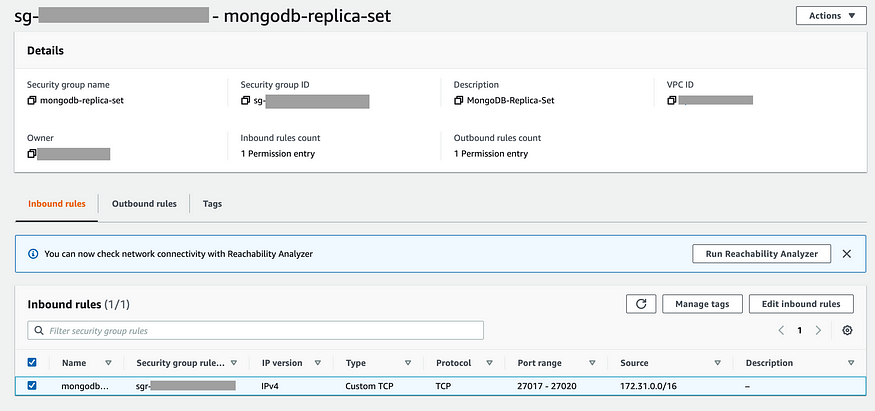
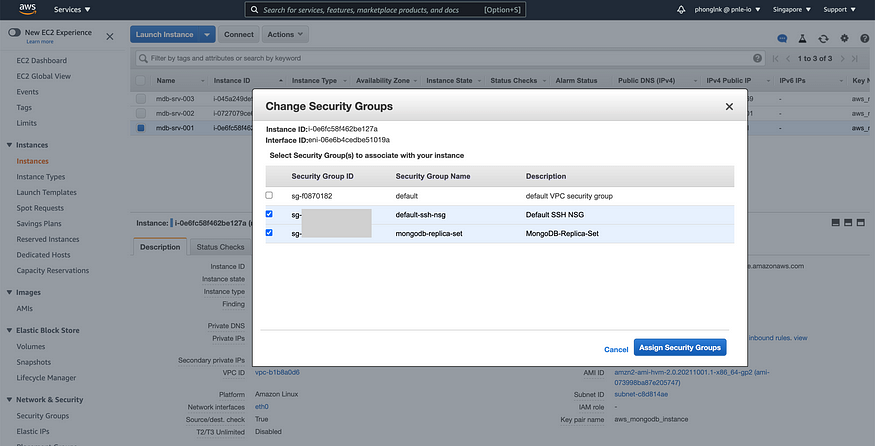
Attach the newly created network security group to all 3 EC2 instance nodes.
Using telnet to verify the communication between these nodes
$ telnet <private ip address> <port number>
Configure the replica set
Reconfigure node #1, first Primary node
Check current status of mongod process and stop it
NODE-1 $ sudo systemctl status mongod
NODE-1 $ sudo systemctl stop mongod
Create private key file for authentication between nodes. Note that this is not recommended for Production environment as it increases risk of a key file being compromised. The mechanism of X509 certificate would be good way to move forward.
NODE-1 $ sudo mkdir /var/lib/mongo/pki
NODE-1 $ sudo openssl rand -base64 741 > /var/lib/mongo/pki/mongodb-keyfile
NODE-1 $ sudo chown -R mongod: mongod /var/lib/mongo/pki
NODE-1 $ sudo chmod 600 /var/lib/mongo/pki/mongodb-keyfile
Modify configuration file: /etc/mongod.conf to support replica set
...
# network interfaces
net:
  port: 27017
  bindIp: <private ip of node 1>, 127.0.0.1
...
security:
  authorization: enabled
  keyFile: /var/lib/mongo/pki/mongodb-keyfile
..
replication:
  replSetName: mdb-repl
Restart the mongod process and verify the status
NODE-1 $ sudo systemctl start mongod
NODE-1 $ sudo systemctl status mongod
If starting failed, check the log of mongod process for troubleshootingNODE-1 $ sudo tail -f /var/log/mongodb/mongod.log
Initialize the replica set configuration and create first supper-admin
# login to test replica set
NODE-1 $ mongo --port 27017# init replica set configuration
test> rs.initiate()# create first root user
test> use admin
test> db.createUser(
       {
            user: "<username>",
            pwd: "<password>",
            roles: [
                {
                   role: "root",
                   db: "admin"
                }
            ]
       } )test> exit
Verify the replica set status for default information of replica set topology
# login with newly created user
NODE-1 $ mongo --host "<repl-set-name>/<private ip>:27017>" --username <username> --password <password> --authenticationDatabase admin# check repl set status
PRIMARY > rs.status()
Reconfigure node #2, Secondary node #1
Copy private key from NODE-1 to NODE-2 for authentication
# using scp to copy private key from node 1 to node 2, home directoy# prepare authentication key at node 2
NODE-2 $ sudo mkdir /var/lib/mongo/pki
NODE-2 $ sudo mv ~/mongodb-keyfile /var/lib/mongo/pki/mongodb-keyfile
NODE-2 $ sudo chown -R mongod: mongod /var/lib/mongo/pki
NODE-2 $ sudo chmod 600 /var/lib/mongo/pki/mongodb-keyfile
Check current status of mongod process and stop it
NODE-2 $ sudo systemctl status mongod
NODE-2 $ sudo systemctl stop mongod
Modify configuration file: /etc/mongod.conf to support replica set
...
# network interfaces
net:
  port: 27018
  bindIp: <private ip of node 2>, 127.0.0.1
...
security:
  authorization: enabled
  keyFile: /var/lib/mongo/pki/mongodb-keyfile
..
replication:
  replSetName: mdb-repl
Restart the mongod process and verify the status
NODE-2 $ sudo systemctl start mongod
NODE-2 $ sudo systemctl status mongod
If starting failed, check the log of mongod process for troubleshooting
NODE-2 $ sudo tail -f /var/log/mongodb/mongod.log
Reconfigure node #3, Secondary node #2
Copy private key from NODE-1 to NODE-3 for authentication
# using scp to copy private key from node 1 to node 3, home directoy# prepare authentication key at node 3
NODE-3 $ sudo mkdir /var/lib/mongo/pki
NODE-3 $ sudo mv ~/mongodb-keyfile /var/lib/mongo/pki/mongodb-keyfile
NODE-3 $ sudo chown -R mongod: mongod /var/lib/mongo/pki
NODE-3 $ sudo chmod 600 /var/lib/mongo/pki/mongodb-keyfile
Check current status of mongod process and stop it
NODE-3 $ sudo systemctl status mongod
NODE-3 $ sudo systemctl stop mongod
Modify configuration file: /etc/mongod.conf to support replica set
...
# network interfaces
net:
  port: 27019
  bindIp: <private ip of node 3>, 127.0.0.1
...
security:
  authorization: enabled
  keyFile: /var/lib/mongo/pki/mongodb-keyfile
..
replication:
  replSetName: mdb-repl
Restart the mongod process and verify the status
NODE-3 $ sudo systemctl start mongod
NODE-3 $ sudo systemctl status mongod
If starting failed, check the log of mongod process for troubleshooting
NODE-3 $ sudo tail -f /var/log/mongodb/mongod.log
Add node to replica set
Connect SSH to primary node and login to replica set via Mongo shell
NODE-3 $ mongo --host "<repl-set-name>/<primary-node-private-ip>:27017" --username <username> --password <password> --authenticationDatabase admin# check replica set status
PRIMARY> rs.status()# add secondary nodes to replica set
PRIMARY> rs.add("<node 2 ip address>:27018")
PRIMARY> rs.add("<node 3 ip address>:27019")# check master node status
PRIMARY> rs.isMaster()# safely elect new primary node
PRIMARY> rs.stepDown()# recheck new primary node
PRIMARY> rs.isMaster()
Simple unit testing of replica set
Create new database, collection with sample data at primary node
NODE-1 $ mongo --host "<repl-set-name>/<primary-node-private-ip>:27017" --username <username> --password <password> --authenticationDatabase adminPRIMARY> use new_database
PRIMARY> use new_collection
PRIMARY> db.new_collection.insert( { "name": "Phong", "location": "Singapore" } )
PRIMARY> db.new_collection.find()
Verify the replicated data on secondary node
NODE-2 $ mongo --host "<secondary-node-private-ip>:27018" --username <username> --password <password> --authenticationDatabase adminSECONDARY> show dbs
It shows exception as current secondary node which is not master.
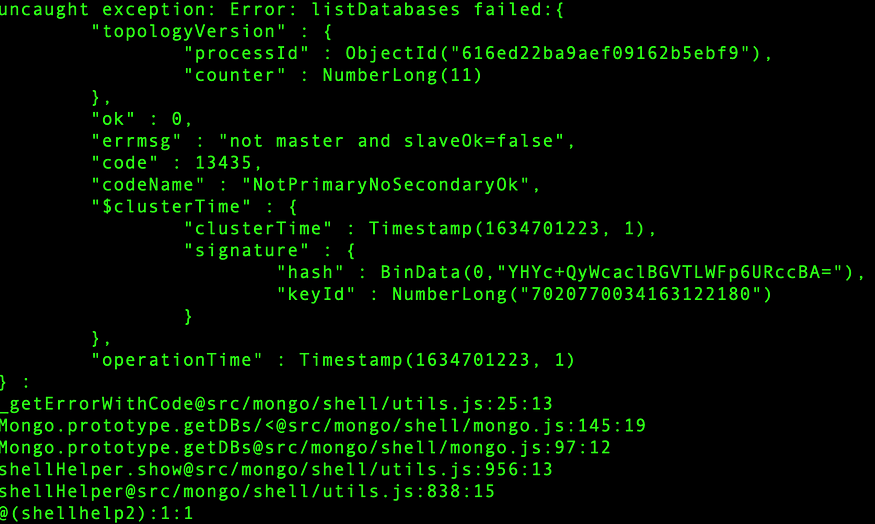
Configure current secondary node with read-only permission
SECONDARY> rs.secondaryOk()
SECONDARY> show dbs
...
new_database   0.0000GB
...
SECONDARY> use new_database
SECONDARY> show collections
SECONDARY> db.newCollection.find()
Try to insert new record at secondary node. It throws exception “NotWritablePrimary”
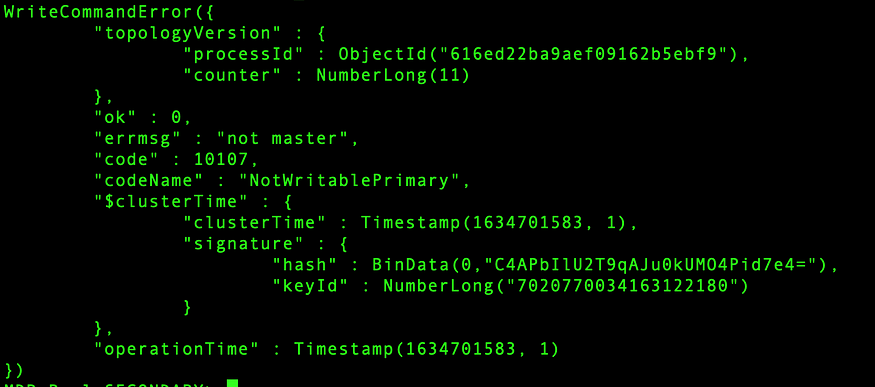
For further reference, you can refer to MongoDB official technical documentation at https://docs.mongodb.com/manual/tutorial/deploy-replica-set/

 MongoDB for Everyone
Leave a comment